
Miscellaneous Features
Discover additional tools and features that enhance your learning experience and communication across all subjects and languages.
Share Messages to Messaging Apps
Share messages (text and audio) directly to your messaging apps like WhatsApp, Telegram, and others. This feature allows you to seamlessly communicate translations with friends, language partners, or study groups.
How to Share Text & Audio
Step 1: Access the Sharing Menu
Inside a conversation, long-press on any translation to open the context menu.
Select "Text & Audio" from the menu options.
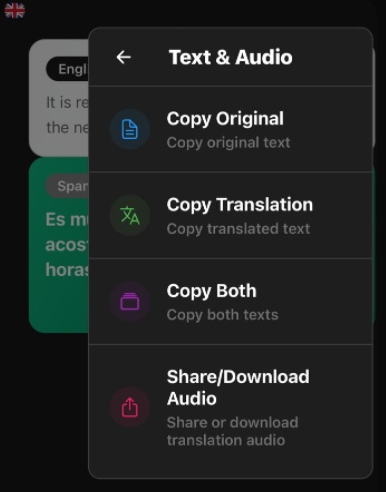
Step 2: Choose Your Sharing Option
In the Text & Audio menu, you have several options:
- Copy Original: Copy the original text to your clipboard
- Copy Translation: Copy the translated text to your clipboard
- Copy Both: Copy both original and translation texts
- Share/Download Audio: Share the translation audio directly as a voice message
Step 3: Share to Your Messaging Apps
When you select "Share/Download Audio", you'll see native sharing options for your device. You can share the created audio directly as a voice message via WhatsApp, Telegram, Signal, and other messaging apps.
This is perfect for practicing pronunciation with language partners or sharing translations in real conversations!
💡 Pro Tip: Use the audio sharing feature to send voice messages in your target language without having to pronounce them yourself - perfect for learning proper pronunciation!
Additional Features
octa AI includes many more features to enhance your learning experience:
📊 Study Analytics
Track your progress with detailed analytics, including study time, completion rates, and performance trends.
🎯 Custom Quizzes
Create custom quizzes from your study materials or let AI generate them automatically based on your content.
📅 Smart Scheduling
Intelligent study scheduling that adapts to your availability and learning pace, with deadline reminders and exam prep timelines.
🔔 Notifications
Stay on track with customizable notifications for study sessions, upcoming exams, and review reminders.
☁️ Cloud Sync
Access your study materials across all your devices with seamless cloud synchronization.
🌙 Dark Mode
Comfortable studying at any time with automatic or manual dark mode switching.